Knowledge Base
Keep Emails from specific people or domains from going into your Junk folder
Posted 2026-01-08 11:27:55| Updated 2026-01-08 11:27:55There are times when you don't want emails coming from a specific person or website to end up in your Junk folder.
At the top of the page, select Settings
 > Mail > Accounts > Block or allow.
Under Block or allow, select Automatically filter junk email.
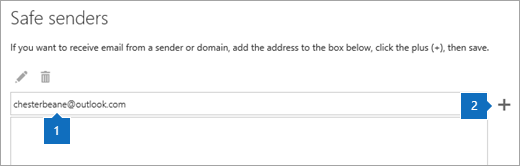
Under Safe Senders and Recipients, type the email address or domain, so that emails from the sender or domain don't get moved to your Junk folder, and then select Add
 .
.
Select Save
 .
.Tip: To edit or remove emails or domains from the Safe senders list, select the item in the list and then select Edit
 or Remove
  .
.