Knowledge Base
How to change password in Cpanel
Posted 2026-01-08 13:20:20| Updated 2026-01-08 13:20:20Here is the steps to reset/change your password in CPanel.
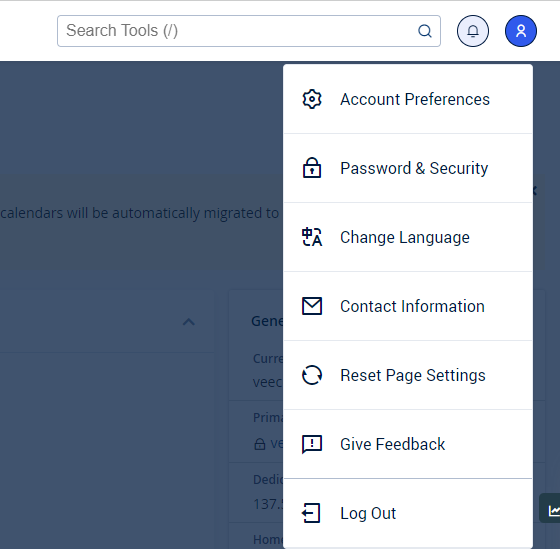
1. Navigate to Password & Security (Refer image below)
2. Then, you will be directed to this page. Now, you may change your password as per your preference. It is also strongly recommended to use the Password Generator to create your password.
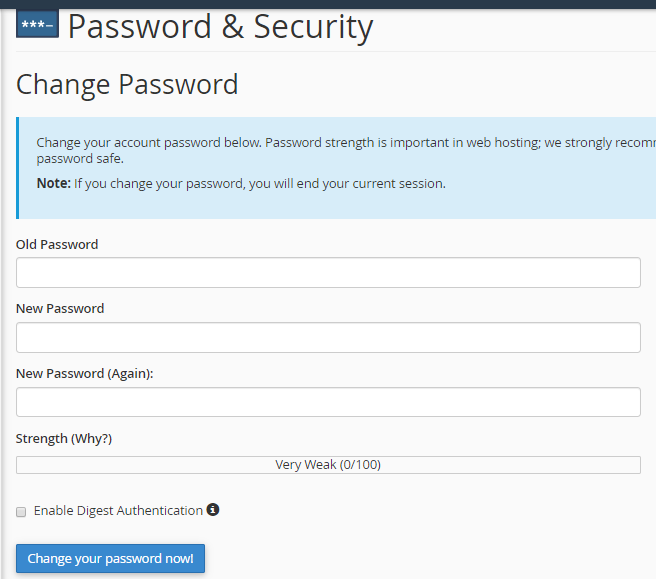
Key-in the Old Password, New Password and New Password (again) fields.
Please leave the Enable Digest Authentication unticked.
Click on Change your password now!
Thank you