Knowledge Base
Creating cpanel User/Account Level Filtering to move the Email to Junk folder
Posted 2026-01-08 13:36:23| Updated 2026-01-08 13:36:23To access cPanel, perform the following steps:
1) Access your cPanel over an encrypted connection with your domain name, as one of the URL:
2) Click on the User Level Filtering icon on the main screen of your cPanel interface.
3) On the Create a New Filter page, you will see that that you can add multiple rules and action to a single filter. 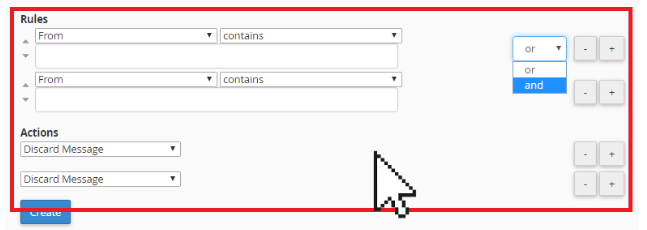
4) Type in a name for the filter.

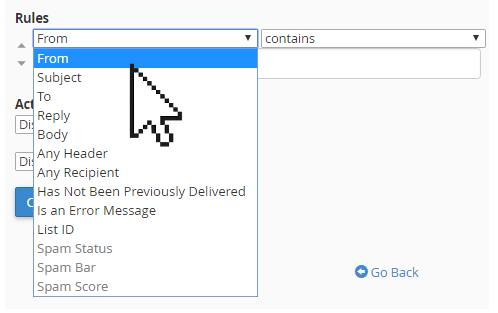
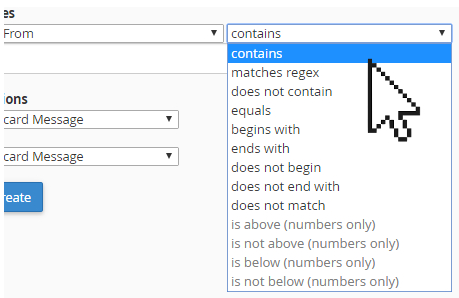
5) In the Rules option, select From as contains and in the Actions option, select on Deliver to folder.
6) Click on Browse and select on Junk.
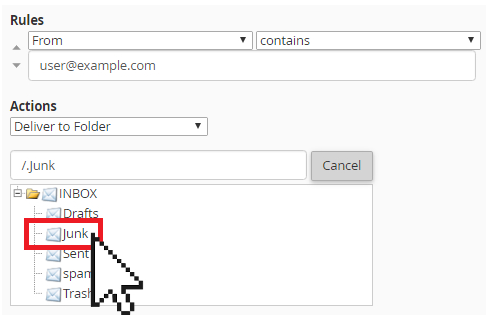
7) Click on Create to save the rule.